Why Does My Robot Vacuum Keep Stopping Mid-Clean?
A robot vacuum that keeps stopping mid-clean usually has a low battery, a jammed brush or wheel, a blocked path, or a bin that needs attention. Check its lights or app message first, then inspect and restart it according to the manual.
On this page (8 sections)
- Why does my robot vacuum keep stopping mid-clean?
- What should you check first when the robot stops?
- Why does my robot vacuum stop in the same place?
- Can a full bin or dirty filter stop the vacuum?
- Why does my robot vacuum stop before returning to its dock?
- How can you restart a robot vacuum safely?
- When should you contact the manufacturer?
- How do you prevent a robot vacuum from stopping again?
A robot vacuum that keeps stopping mid-clean usually has a low battery, a jammed brush or wheel, a blocked route, or a bin that needs attention. Check its lights or app message first, then inspect and restart it according to the manual.
Start with the spot where it stopped and any message the robot gives you. That can help distinguish a simple obstruction from a charging, maintenance, or navigation problem.
Why does my robot vacuum keep stopping mid-clean?
Most stops come from a low charge, tangled debris, a blocked path, or a maintenance alert. The robot's indicator, app, or manual may identify which one to check first.
If it stops at the same place each time, look for a cord, rug edge, threshold, furniture leg, or other obstacle. If it stops in different places, inspect the battery, brush, wheels, bin, and filter.
Don't assume every pause is a breakdown. Some robots return to the dock to recharge or need a user prompt before continuing; follow the model's instructions.
What should you check first when the robot stops?
Look at the robot's lights and app message before moving it. These can point to a stuck brush, low battery, full bin, or another issue specific to your model.
If there is no clear message, check the area around the robot for loose cords, small objects, rug fringe, or a tight gap. Then turn it off as the manual directs before checking underneath.
Use the manufacturer's instructions for removing parts and clearing debris. Avoid forcing a brush, wheel, or cover that won't come free.
Could the battery or dock be interrupting the clean?
Yes, a low charge or poor contact with the dock can interrupt a cleaning run. Check whether the robot is charging and whether it returns to the dock when it stops.
Make sure the dock is powered and set up as its manual requires. Clean charging contacts only as directed, and let the robot charge before starting another run.
A longer charging time can be normal for some models. Our guide to how long a robot vacuum takes to charge explains what affects charging and what to check if the robot won't charge.
Can a tangled brush or wheel make it stop?
Yes, hair, threads, and small debris can keep a brush or wheel from turning freely. Switch the robot off and check the brush, side brush, and wheels using the manual's cleaning steps.
Remove only debris you can reach without pulling hard or using a sharp tool. Refit any parts securely before restarting the vacuum.
If you want a model with features aimed at reducing hair tangles, the Roborock Q7 M5+ has a dual anti-tangle brush design for its main and side brushes.
That feature doesn't remove the need to check for debris or follow the care instructions. Choose a robot based on your floor and maintenance needs, not the promise of a tangle-free run.
Why does my robot vacuum stop in the same place?
A repeat stop at one location often points to an obstacle or a transition the robot can't cross. Check for cords, rug fringe, clutter, low furniture, or a raised doorway strip.
Move loose items, then start a short run and watch whether the robot clears the area. If a rug edge catches it, secure the rug or set a boundary if your model supports one.
For a raised threshold, measure its height and shape before changing the layout. See whether robot vacuums can go over transitions for practical fit considerations.
Could a dark rug or drop-off trigger a pause?
A sensor may react to a floor edge or surface in a way that interrupts the run. Check the manual for sensor cleaning and placement advice, especially near stairs or abrupt floor changes.
Don't cover or disable a safety sensor to force the robot onward. Clear the route or use a supported keep-out zone if the robot is stopping in a place it should avoid.
Can a full bin or dirty filter stop the vacuum?
A full bin, clogged filter, or blocked intake can limit airflow and may prompt a pause or alert. Empty the bin and clean or replace the filter as the manual allows.
Check that the bin is seated correctly and that no debris blocks the opening. A self-emptying dock can reduce how often you empty the robot by hand, but it doesn't eliminate upkeep.
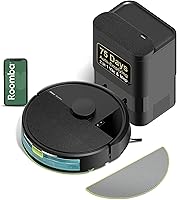
The Roomba 105 Vac with AutoEmpty Dock empties into its dock, and the Roomba Home app can show filter life. Its controls also let you target rooms and set keep-out zones.
An auto-empty dock won't resolve a jammed brush, blocked path, or charging problem. Check the robot itself if it stops after leaving the dock.
Why does my robot vacuum stop before returning to its dock?
A blocked route, changed dock position, or low battery can keep a robot from reaching its base. Clear the route and check that the dock is powered and positioned according to the manual.
Avoid carrying the robot to a different room and starting it there if it depends on its dock or map to find its way back. If you do move the dock, follow the setup instructions and let the robot remap if required.
The Shark AI Ultra AV2501S supports Recharge and Resume, so it can return to charge and pick up where it left off. Its LiDAR mapping is designed to map the home and detect objects in its path.
This feature won't prevent stops caused by a tangled brush, full bin, or blocked route. Check the robot's alert and clear the underlying issue first.
How can you restart a robot vacuum safely?
Clear the cause of the stop, then restart the robot using the maker's steps. Check that removable parts are reinstalled, the route is open, and the battery has enough charge.
- Read the indicator or app message.
- Turn the robot off as directed.
- Remove accessible debris from the brush, wheels, and intake.
- Empty and reseat the bin, then check the filter.
- Place the robot on its dock or starting point as instructed.
- Start a short cleaning run and watch for another stop.
If the same alert returns, note where it happened and what the robot displayed. That information can help the maker's support team narrow down the cause.
For setup issues that began with the first run, see how to set up a robot vacuum. A setup check can help confirm the dock, route, and map are ready.
When should you contact the manufacturer?
Contact the manufacturer if the robot repeatedly stops after you clear basic obstructions and follow its manual. Also get support if it won't charge, shows the same error repeatedly, or has visible damage.
Don't open sealed parts or try repairs the manual doesn't describe. If the battery is swollen, unusually hot, or damaged, stop using the robot and follow the maker's safety guidance.
How do you prevent a robot vacuum from stopping again?
Keep the route clear, clean the brushes and sensors as directed, and start runs with enough charge. Empty the bin and check the filter on the schedule in the manual.
Pick up cords and small objects before scheduled runs, and secure rug fringe near the robot's path. If power use and charging are part of your concern, our guide to robot vacuum electricity use explains what affects energy use.
If stops continue, record the location, battery state, and any error message. Use that pattern to decide whether the issue is the route, routine maintenance, or a fault that needs support.
Frequently asked questions
Why does my robot vacuum stop after a few minutes?
A robot vacuum that stops after a few minutes may have a low charge, a brush or wheel caught on debris, or a path it can't cross. Check its indicator or app message, then inspect the robot and dock using the manual.
If it repeatedly stops on a clear floor, contact the maker's support.
Should I move my robot vacuum when it stops?
Check the robot's lights or app before moving it, since an error message may point to a specific cause. If it is stuck, turn it off as the manual directs, clear nearby cords or debris, and place it back on its dock or starting point as instructed.
Can a full bin make a robot vacuum stop?
A full or poorly seated bin can affect cleaning, and some models may pause or show an alert when attention is needed. Empty and reinstall it as the manual explains, then check the filter and airflow path.
Self-emptying docks reduce manual emptying but still need maintenance.
Why does my robot vacuum keep stopping near rugs or doorways?
A rug edge, raised transition, loose cord, or narrow doorway can block a robot vacuum or catch a wheel. Clear loose items and check whether the robot can cross the threshold.
Our guide to robot vacuums and floor transitions explains what to measure before changing your setup.