Do Robot Vacuums Use a Lot of Electricity?
Robot vacuums usually use a modest amount of electricity, because they run from a rechargeable battery and return to a dock when they need power. How much they use depends on cleaning time, suction settings, and whether the dock has extra features.
On this page (7 sections)
- Do robot vacuums use a lot of electricity?
- What affects robot vacuum electricity use?
- Does a self-emptying dock use more electricity?
- How can you estimate your robot vacuum's electricity use?
- How can you reduce electricity use without losing useful cleaning?
- How long does a robot vacuum take to recharge?
- Should electricity use decide which robot vacuum you choose?
Robot vacuums usually use a modest amount of electricity because they run on rechargeable batteries and return to a dock when they need power. Their energy use depends on how often and how long they clean, the suction setting, and any extra dock functions.
The exact amount varies by model and household. A compact floor plan may take less time to clean than a large home, while frequent runs and high suction can increase operating time.
Do robot vacuums use a lot of electricity?
Most robot vacuums are not large electricity users compared with major household appliances. They draw power while charging and during cleaning, but battery operation limits the time they pull power directly from the outlet.
A robot that runs longer or cleans more often will generally need more charging. The dock may also draw power while the robot waits there, and a dock with an emptying feature has an additional function to consider.
Manufacturers don't always publish the energy use needed to estimate a household's exact cost. If you need a precise figure, measure the robot and dock with a suitable plug-in energy monitor, following the monitor's instructions.
What affects robot vacuum electricity use?
Cleaning time, suction level, schedule, and dock design are the main factors to consider. A robot may also run longer if it needs to recharge before finishing a large job.
A model's battery-life figure describes possible runtime, not its exact electricity use. For example, the Roomba 105 Vac lists a battery life of 200 minutes and has 4 suction power levels, while the Roborock Q7 L5 lists 150 minutes of battery life.
The Roomba 105 Vac can recharge and resume a cleaning task if its battery runs low. That helps it finish a job, though a longer total cleaning session may require more charging.
Its app also supports schedules for specific times or rooms. To understand how navigation and cleaning steps fit together, see how a robot vacuum works.
Does higher suction use more electricity?
A higher suction setting may use more power while the robot is cleaning. The effect depends on the model, so check its manual or energy information for details.
Choose a lower setting where it suits the floor and mess. Use more suction when needed, then return to a setting that works for routine cleaning.
Does a larger home use more electricity?
A larger home can take more time to clean, which may mean more energy use. The layout, obstacles, and chosen rooms also affect how long a job takes.
Room targeting can help avoid cleaning areas that don't need attention. A robot that can recharge and resume may finish a large job across more than one battery run.
Does a self-emptying dock use more electricity?
A self-emptying dock can use extra power when it empties the robot's bin. How much it adds depends on the dock and how often it runs.
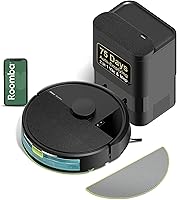
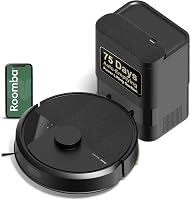
The Roomba 105 Vac with AutoEmpty Dock is designed to hold debris for up to 75 days in a bag. That can reduce how often you empty the robot by hand, but the dock still needs power for charging and its emptying function.
If your priority is simpler upkeep, compare that option with the standard Roomba 105 Vac. For help deciding how often a robot should run, read how to set up a robot vacuum.
How can you estimate your robot vacuum's electricity use?
A plug-in energy monitor is the simplest way to measure the electricity used by a robot and its dock. It can show energy over a chosen period, which helps account for charging and standby time.
Follow the monitor's instructions and record its reading over several days of your normal schedule. For a fair comparison, use the same schedule and cleaning areas for each robot.
A utility bill can show the total cost of household electricity, but usually won't isolate one appliance. Check your local rate and multiply it by the energy reading if the monitor reports kilowatt-hours.
How can you reduce electricity use without losing useful cleaning?
Schedule cleaning only as often as your floors need it. Target busy rooms, clear obstacles, and use a suitable suction level rather than running the robot more than necessary.
Keep the charging dock in an accessible place so the robot can return without getting stuck. Our guide to why a robot vacuum keeps stopping covers common interruptions that can disrupt a run.
If you don't want app-based scheduling, check whether the robot supports button or voice control. See whether robot vacuums need Wi-Fi before choosing a setup.
How long does a robot vacuum take to recharge?
Charging time varies by model, battery level, and charging design. Use the manufacturer's guidance for a useful estimate rather than assuming all robots recharge at the same rate.
The Roomba 105 Vac can return to its dock and resume its task after charging when needed. For more detail on charging routines, see how long a robot vacuum takes to charge.
Should electricity use decide which robot vacuum you choose?
Treat electricity use as one factor alongside cleaning needs and dock features. A robot that fits your home and schedule can avoid unnecessary runs, while its manual or an energy monitor can help you check actual use.
Choose the Roomba 105 Vac if you want room targeting and adjustable suction in a standard dock setup. Consider the Roborock Q7 L5 if you also want vacuuming and mopping in one run, or the Roomba 105 Vac with AutoEmpty Dock if fewer manual bin emptyings matter.
For a wider look at features and fit, start with the robot vacuum guide. The practical rule is simple: schedule only the cleaning you need, and measure your own setup if exact electricity use matters.
Frequently asked questions
Do robot vacuums use more electricity when they clean every day?
Daily cleaning means more operating time, so it can use more energy than occasional cleaning. The exact amount depends on the robot, selected suction level, floor layout, and how long each run takes.
A schedule focused on busy rooms may reduce unnecessary cleaning time.
Does a robot vacuum use electricity while docked?
A dock needs power to charge a robot, and some docks also run extra functions. Check the manual for your model's standby and charging details, then unplug it only if the manufacturer says that's appropriate and you don't need scheduled cleaning.
Do self-emptying robot vacuums use more electricity?
A self-emptying model can use power for its dock's emptying function as well as charging. How much that adds depends on the dock and how often it empties.
The Roomba 105 Vac with AutoEmpty Dock is designed to hold debris for up to 75 days, which can mean fewer emptying cycles.
How can I reduce a robot vacuum's electricity use?
Set a schedule that matches your home's dirt and foot traffic, and avoid cleaning empty rooms unnecessarily. If your robot offers suction settings or room targeting, use them to match the task.
Keep its path clear so it can complete a run without repeated interruptions.