How to Set Up a Robot Vacuum for Its First Run
To set up a robot vacuum, place its dock, clear loose hazards, charge the robot, and follow its app or manual setup steps before starting a supervised first run.
On this page (8 sections)
- How do you set up a robot vacuum for its first run?
- Where should you put the charging dock?
- How should you prepare rooms before mapping?
- Does a robot vacuum need an app or Wi-Fi for setup?
- Should you map first or start cleaning?
- What should you check before the first cleaning run?
- How do you know setup is complete?
- What should you do after the first run?
To set up a robot vacuum, place its dock, clear loose hazards, charge the robot, and follow its app or manual setup steps before starting a supervised first run. Keep doors open to the rooms you want it to clean, and watch how it handles rugs, thresholds, and furniture.
A little preparation helps the robot find its way back to the dock and reduces the chance of a stuck first run. The exact app steps and charging instructions vary by model, so use the manual when they differ from this general sequence.
How do you set up a robot vacuum for its first run?
Unpack it, place the dock, charge the robot, prepare the floor, then start setup in the app or on the robot. Stay nearby during the first run so you can clear a snag or adjust the room if needed.
- Remove packaging and install any parts the manual identifies.
- Put the dock in an accessible spot near a power outlet.
- Place the robot on the dock and charge it as directed.
- Install the app if you want app controls, then follow its pairing steps.
- Open the doors to rooms you want cleaned and clear loose hazards.
- Start the recommended mapping or cleaning run.
- Watch the robot return to the dock, then review its map or alerts.
Some models can start from buttons without an app, while app features may need Wi-Fi. Our guide to whether robot vacuums need Wi-Fi explains what may work without a connection.
Where should you put the charging dock?
Place the dock on a level, stable floor with open space around it, following the clearance distances in the manual. Keep it near an outlet and in a spot the robot can reach without weaving around clutter.
Avoid narrow corners, loose rugs that bunch under the dock, and locations where a door could block the robot. If the dock has a self-emptying or mop-washing function, leave room to remove its bag, tank, or other parts for care.
Should the robot start from its dock?
Starting from the dock helps the robot build a reliable route back to its charging point. Avoid moving the dock during mapping or a scheduled clean unless the manual explains how to update its location.
A robot that starts elsewhere may still clean, but it may have trouble finding the dock afterward. If it struggles to return, check the path and dock position before changing app settings.
How should you prepare rooms before mapping?
Open the doors to rooms you want included and remove objects that could tangle, trap, or tip the robot. Pick up charging cords, small toys, socks, loose fabric, and lightweight items near its route.
Secure dangling curtains and move fragile objects away from low shelves. Block stairs or other drop-offs if the robot's sensors or manual call for a barrier, and keep people and pets clear while it learns the space.
A robot may avoid some obstacles, but that doesn't mean every loose object is safe to leave on the floor. Clear the area around floor vents and narrow gaps where the vacuum could become wedged.
Does a robot vacuum need an app or Wi-Fi for setup?
Follow the model's setup instructions; app pairing and Wi-Fi needs vary. An app may help you connect the robot, create a map, set a schedule, or choose rooms, while a robot's buttons may offer basic start and stop controls.
If pairing fails, confirm the phone is on the network the manual requires and that the robot is close enough to the router during setup. Avoid resetting the robot or deleting its map until you've checked the maker's troubleshooting steps.
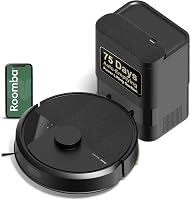
The Roomba 105 Combo uses a 2.4 GHz network for setup and operation, and its app supports room targeting and keep-out zones.
This model also offers button and voice-assistant controls. Its dock is an AutoEmpty dock, so leave space to access it after the robot returns.
Should you map first or start cleaning?
Use the mapping option if your model offers one, then start a supervised clean after checking the map. If it maps while cleaning, clear the route first and let the robot complete its run without moving it.
Open the doors to areas you want mapped and close doors to rooms that should stay out. Keep the dock in place, and don't carry the robot between rooms during the run unless the manual tells you to.
The Shark AI Ultra AV2501S uses LiDAR to map the home and supports schedules, on-demand runs, and targeted areas through the SharkClean app.
After mapping, check that the rooms and boundaries look right in the app. Make corrections only through options supported by that model.
What should you check before the first cleaning run?
Check the floor, brush area, dock path, and any mop parts before starting. Remove packing materials, secure loose rugs if needed, and make sure brushes or pads are installed as the manual directs.
If the robot also mops, fill or attach its water parts only as instructed. Move rugs out of the way or set the supported carpet-avoidance options before a wet run.
The Shark Navigator AV2110S offers app settings for maps, no-go zones, schedules, and target cleaning.
How do you handle rugs and thresholds?
Check how your robot is meant to handle rug edges and floor transitions before the first run. Remove fringe or loose edges that could catch, and use a boundary option or barrier if a rug or threshold causes trouble.
A robot's ability to cross a threshold depends on its design and the floor conditions. Our guide to robot vacuums and transitions covers bumps, rug edges, and transition strips.
How do you know setup is complete?
Setup is ready for routine use when the robot can start, clean its intended area, and return to the dock without an unresolved alert. Review its map if available and check that doors, boundaries, and room choices match your plan.
If the first run stops, check for a blocked brush, trapped wheel, low charge, or obstacle in its path. Our guide to why a robot vacuum keeps stopping walks through common causes.
For a better understanding of its route and sensors, see how a robot vacuum works. To choose a model around your floor plan and preferred controls, start with how to choose a robot vacuum.
What should you do after the first run?
Empty or maintain the robot as its manual directs, then adjust the map or schedule based on what happened. Remove any caught debris, check the dock is clear, and note rooms or obstacles that need a boundary.
If the robot missed a room, check whether the door was open and whether the map includes that area. If it had trouble with a rug or threshold, adjust the route or barrier before scheduling another run.
Pick the setup that fits the features you plan to use: use onboard controls for a simple start, or finish app and mapping steps if you want room targeting and schedules. Once the robot completes a clean and returns to its dock, set the next run around your normal routine.
Frequently asked questions
How long should I charge a robot vacuum before its first run?
Charge it as directed in its manual or app, since first-charge instructions differ by model. Place it on the dock with its charging contacts aligned, and wait for the app or status light to show that it is ready.
See the charging guide if you need help estimating the wait.
Does a robot vacuum need Wi-Fi to work?
Some models need Wi-Fi for setup or app features, while basic cleaning may be available from onboard buttons. Check the manual for your model's requirements before setup, and see our guide to robot vacuums without Wi-Fi for what to expect.
Should I pick up everything before a robot vacuum's first run?
Clear cords, small objects, loose fabric, and anything the robot could pull or catch. You don't need to make the room bare, but remove likely snags and secure items around stairs, floor vents, and delicate objects before supervising the first run.
Should I map my home before the first cleaning?
Follow the model's setup flow: some robots make a map during a dedicated mapping run, while others map as they clean. Open doors to the rooms you want included, keep the route clear, and let the robot return to its dock without moving it.