8 Best Robot Vacuums for Seniors (November 2026)
The best easy-to-use robot vacuums for seniors include the Roborock Q7 M5+ for scheduled cleaning, the Roomba 115X Combo with AutoEmpty Dock for voice and button control, and the Shark AI Ultra AV2511AE for a bagless self-empty base.
On this page (7 sections)
The best robot vacuum for seniors is the Roborock Q7 M5+, with scheduled app cleaning, LiDAR room mapping and a self-emptying dock. For voice commands and a robot button, consider the Roomba 115X Combo; if you prefer a physical remote, the ILIFE A30s Plus includes one.
Ease of use depends on what you want to avoid doing. A self-empty dock can mean less frequent bin emptying, while a remote or robot button can make everyday control simpler if you don't want to reach for a phone.
For more on matching features to a home, see our robot vacuum choosing guide. If floor area is a concern, compare these picks with our guide to robot vacuums for apartments.
Our picks at a glance
-
1
-
2
 Best for voice and button control
Roomba 115X Combo with AutoEmpty Dock
8.7/10 our score
See it on Amazon -
3

- 4
 Check it
Roomba 105 Combo with AutoEmpty Dock
Best for vacuuming and mopping - 5
 Check it
Roomba 105 Vac with AutoEmpty Dock
Best for dry-floor cleaning - 6
 Best for obstacle detectionCheck it
- 7
 Best for scheduled app cleaningCheck it
- 8
 Best for a physical remoteCheck it
How we chose easy-to-use robot vacuums for seniors
The most useful features for this shortlist are low-touch debris disposal, clear control options and room mapping. We compared the supplied product details against those needs, including whether each model has a robot button, voice control or a remote.
A dock's capacity is only one part of upkeep. Bagged docks need replacement bags, bagless bases avoid those bags, and mopping models add a washable pad or other mop care.
We also considered whether each robot can clean on a schedule or target a room or spot. For a broader look at features that affect daily use, read what to look for in a robot vacuum.
Our score weighs specs and features against what you're shopping for. It reflects fit for this guide, not evaluation through firsthand use.
| Product | Best for | Controls | Dock | Mapping | Our score |
|---|---|---|---|---|---|
| Roborock Q7 M5+ | scheduled cleaning | App and robot buttons | 2.7 L sealed dust bag | PreciSense LiDAR | 9.1 |
| Roomba 115X Combo with AutoEmpty Dock | voice and button control | App, voice and robot buttons | 2.5 L sealed bag | ClearView LiDAR | 8.7 |
| Shark AI Ultra AV2511AE | a bagless self-empty base | App and voice | 360° LiDAR | 8.6 | |
| Roomba 105 Combo with AutoEmpty Dock | vacuuming and mopping | App, voice and robot buttons | Bag holds up to 75 days of debris | 8.3 | |
| Roomba 105 Vac with AutoEmpty Dock | dry-floor cleaning | App, voice and robot buttons | Bag holds up to 75 days of debris | ClearView LiDAR | 8.0 |
| Shark Navigator RV2120AE | obstacle detection | App | 7.6 | ||
| Shark Navigator AV2110S | scheduled app cleaning | App | 7.5 | ||
| ILIFE A30s Plus | a physical remote | App, voice and remote | LiDAR | 7.3 |
The best easy-to-use robot vacuums for seniors
The Roborock Q7 M5+ leads for routine app scheduling and self-emptying, while the other picks offer different control and upkeep choices. Match the controls and dock style to the tasks you want to make easier.
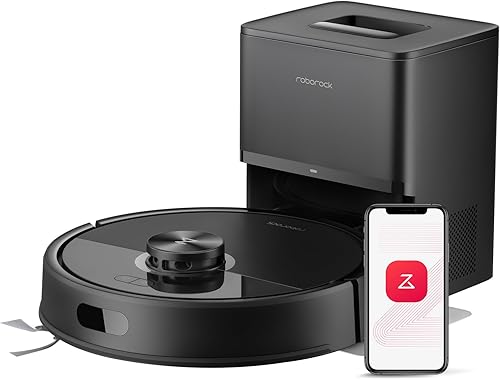
Roborock Q7 M5+: Best for scheduled cleaning
- Self-empty dock
- App scheduling and spot cleaning
- LiDAR room mapping
- Vacuuming and mopping
App schedules, spot cleaning and no-go zones give you several ways to set up routine cleaning. The sealed dust bag can reduce how often you empty debris by hand.
Pros
- Self-empty dock with sealed bag
- App supports schedules and spot cleaning
- LiDAR mapping
Cons
- App requires 2.4 GHz Wi-Fi
- App control may be less suitable if you prefer a remote
The Roborock Q7 M5+ is a strong fit if you want to set cleaning times in advance and reduce frequent dustbin emptying. Its RockDock Plus collects debris in a 2.7 L sealed dust bag, and Roborock says it can support up to 7–9 weeks between bag changes, depending on use.
PreciSense LiDAR maps rooms and plans cleaning paths. In the app, you can schedule runs, start a spot clean, set no-go zones and check cleaning progress and battery life.
It also vacuums and mops in one run, with 3 water-flow settings. If you prefer dry cleaning, leave the mop module off; if you use the mop, plan for pad and water-tank care.
The main drawback for a simple setup is that app features require 2.4 GHz Wi-Fi. Choose this model if scheduling and room mapping are useful to you, and check that app control suits your routine.
Roomba 115X Combo with AutoEmpty Dock: Best for voice and button control
- App, voice and robot-button controls
- AutoEmpty dock
- LiDAR mapping
- Vacuuming and mopping
Use the app, a voice assistant or the robot's button to start cleaning. Its washable mop pad and No Mop Zone setting add a mopping option for sealed hard floors.
Pros
- Three control methods
- Self-empty dock
- No Mop Zone for rugs
Cons
- 2.4 GHz Wi-Fi required for setup
- Mop pad needs washing
The Roomba 115X Combo gives you three ways to start a clean: the app, voice commands or a button on the robot. That range can help if you want to switch between phone control and a direct command at home.
Its AutoEmpty dock uses a 2.5 L AllergenLock bag, which iRobot says traps 99% of pollen and mold and can hold debris for up to 3 months. The bag seals when removed, so you can dispose of it without emptying loose debris.
ClearView LiDAR maps rooms and steers around obstacles such as shoes, pet bowls and furniture. The washable microfiber pad mops sealed hard floors, and you can set a No Mop Zone to protect rugs.
This is a combo model, so it adds mop-pad laundry to the cleaning routine. It also needs 2.4 GHz Wi-Fi for setup; choose it if you value multiple control options and want vacuuming and mopping in one robot.
Shark AI Ultra AV2511AE: Best for a bagless self-empty base
- Bagless self-empty base
- App and voice control
- LiDAR mapping
- Recharge and resume
The bagless base avoids the need to buy disposal bags, and the app or voice commands can start or schedule cleaning. Recharge and resume helps the robot continue after its battery runs low.
Pros
- Bagless self-empty base
- App and voice control
- Recharge and resume
Cons
- No robot-button control is specified
- Runtime is up to 90 minutes
The Shark AI Ultra AV2511AE suits buyers who want a bagless self-empty base and app or voice controls. Its base holds up to 60 days of dirt and debris, and doesn't require disposal bags.
The SharkClean app can schedule cleaning, target messes and set no-go zones. You can also start cleaning with voice commands through Amazon Alexa or Google Assistant.
Its 360° LiDAR maps the home, while Matrix Clean uses a grid pattern with multiple passes over messes. The robot can return to recharge and resume cleaning, and its stated runtime is up to 90 minutes.
The control options listed here don't include a button on the robot. Choose this Shark if app or voice control works for you and you'd rather avoid handling dock bags.
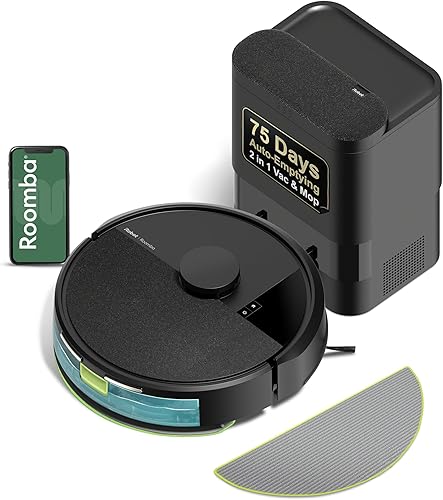
Roomba 105 Combo with AutoEmpty Dock: Best for vacuuming and mopping
- App, voice and robot-button controls
- AutoEmpty dock
- LiDAR mapping
- Carpet avoidance while mopping
This combo model offers three cleaning choices and three ways to control it. It detects and avoids carpets while mopping, so you don't need to set a No Mop Zone for every rug.
Pros
- Three control methods
- Self-empty dock
- Carpet avoidance while mopping
Cons
- 2.4 GHz Wi-Fi required
- Mop pad needs care
The Roomba 105 Combo offers app, voice and robot-button control, with choices to vacuum, mop or do both. Its AutoEmpty dock uses a bag that holds up to 75 days of debris, and iRobot says the bag traps 99% of allergens as small as 0.7 microns.
ClearView LiDAR maps the home, and the robot detects and avoids carpets while mopping. You can schedule or target rooms in the app, adjust suction and cleaning passes, and create keep-out zones.
The microfiber mop pad and adjustable water flow make this a more involved option than a vacuum-only model. You'll need to care for the pad and use a 2.4 GHz Wi-Fi network for setup and operation.
Choose it if you want a mop option and several ways to start a run. If you don't need wet cleaning, the Roomba 105 Vac avoids mop-pad upkeep.
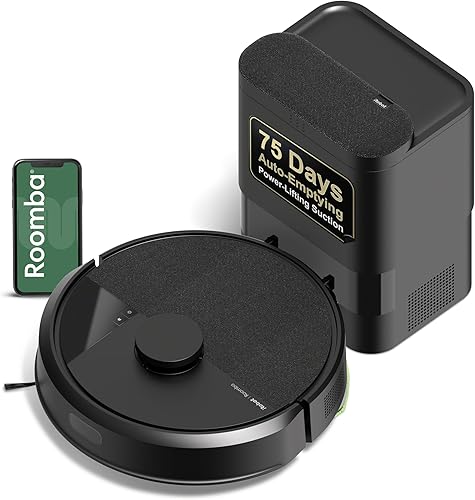
Roomba 105 Vac with AutoEmpty Dock: Best for dry-floor cleaning
- App, voice and robot-button controls
- AutoEmpty dock
- LiDAR mapping
- Spot cleaning
This vacuum-only model cleans dry floors and supports schedules, room targeting and spot cleaning. The robot's buttons offer a direct control option alongside its app and voice controls.
Pros
- Three control methods
- Self-empty dock
- Spot cleaning for up to 5 minutes
Cons
- 2.4 GHz Wi-Fi required
- Does not mop
The Roomba 105 Vac keeps its controls familiar: use the robot buttons, app or voice assistant. It is a vacuum-only option for dry floors, so there is no mop pad to wash or water to manage.
The AutoEmpty dock uses a bag that holds up to 75 days of debris. ClearView LiDAR maps rooms, and the app lets you schedule cleaning, target rooms, set suction levels and create keep-out zones.
A spot-clean mode repeatedly cleans one area for up to 5 minutes. This can help with a small dry mess without asking the robot to clean the whole home.
Setup and operation need 2.4 GHz Wi-Fi. Choose this model if you want the Roomba's three control methods and don't need a mop.
Shark Navigator RV2120AE: Best for obstacle detection
- App control
- Bagless self-empty base
- LiDAR row-by-row navigation
- Detects and avoids objects
Its object detection and bagless base are useful when you want less pre-cleaning and fewer bin-emptying tasks. The app is the listed control method.
Pros
- Detects and avoids objects
- Bagless self-empty base
- Row-by-row cleaning
Cons
- App control only
- No voice control is specified
The Shark Navigator RV2120AE is designed to detect and avoid objects, which can reduce the need to clear every small obstacle before a run. Its SmartPath navigation uses LiDAR to map the home and clean in rows.
After each clean, it empties into a bagless base that Shark says holds up to 60 days of dirt and debris. The self-cleaning brushroll is designed to reduce hair wrap.
App control is the stated control method, with no voice or robot-button option specified here. Choose it if the object detection and bagless base matter more than having several ways to start cleaning.
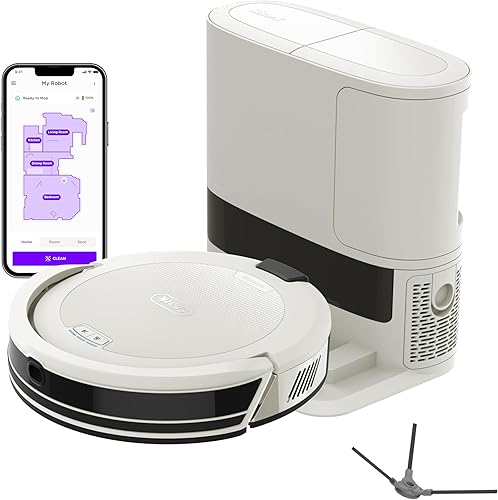
Shark Navigator AV2110S: Best for scheduled app cleaning
- App scheduling and target cleaning
- Bagless self-empty base
- LiDAR row-by-row navigation
- Recharge and resume
The app supports schedules, target cleaning and no-go zones, while the robot maps rooms and cleans in rows. Recharge and resume lets it continue after charging when its battery runs low.
Pros
- Schedules and target cleaning
- Bagless self-empty base
- Recharge and resume
Cons
- App control only
- Base holds less debris than the 60-day Shark options
The Shark Navigator AV2110S is an app-controlled vacuum with scheduling, target cleaning and no-go zones. Its SharkClean app also supports home mapping and voice control through Amazon Alexa and Google Voice.
SmartPath LiDAR maps the home and cleans in a row-by-row pattern. If the battery runs low, the robot can return to the dock, recharge and resume where it stopped.
Its bagless base holds up to 30 days of debris, less than the 60-day Shark bases in this roundup. Choose it if you want app scheduling and a bagless base, and are comfortable controlling the robot through an app.
ILIFE A30s Plus: Best for a physical remote
- App, voice and remote control
- Self-empty station
- LiDAR mapping
- Dual anti-tangle brushes
The included remote gives you a physical control option alongside app and voice commands. Its self-empty station can reduce frequent dustbin emptying.
Pros
- Includes a remote
- App and voice control also available
- Self-empty station
Cons
- App requires 2.4 GHz Wi-Fi
- Station uses dust bags
The ILIFE A30s Plus is the pick for anyone who wants a physical remote as an option. It also supports app and voice control, so you can choose among the included remote, a smartphone or voice commands.
Its LiDAR system maps the home, and the app supports schedules and no-go zones. The self-empty station holds 2.2 L and comes with 5 dust bags; ILIFE says its system can provide up to 250 days of hands-free cleaning, though actual time depends on use.
The app needs 2.4 GHz Wi-Fi. Choose this model if the remote is the feature you expect to use most, and confirm its buttons and setup steps suit you before relying on it.
Which controls should you choose?
Pick the control method you'll be comfortable using every week. A voice assistant can start a run without opening an app, while a robot button or remote can offer a direct option at home.
For the most choices, the Roomba 115X Combo and both Roomba 105 models support app, voice and robot-button controls. The ILIFE A30s Plus adds a remote, while the Shark models here center on app controls, with voice control also specified for the AI Ultra AV2511AE.
Most models with app features need Wi-Fi, and some require 2.4 GHz. If you want to avoid app dependence, confirm which functions remain available through the robot's buttons, remote or voice assistant before you choose.
Will a self-emptying dock reduce upkeep?
A self-empty dock can reduce how often you empty the robot, but it still needs occasional attention. Bagged docks require replacing and disposing of a bag; bagless bases need their debris container emptied.
The longest claimed intervals here vary by model, from up to 30 days for the Shark Navigator AV2110S to up to 250 days for the ILIFE A30s Plus. Treat those as maker-stated limits, since how often you clean and how much debris your home collects affect the interval.
If handling bags is a concern, the Shark AI Ultra AV2511AE and both Shark Navigator models have bagless bases. For a wider look at routine care and setup, start with our robot vacuum guide.
Is a vacuum and mop combo a good fit?
A combo makes sense if you want to add mopping on sealed hard floors and are willing to care for a mop pad. The Roborock Q7 M5+, Roomba 115X Combo and Roomba 105 Combo all offer vacuuming and mopping.
The Roomba 115X has a washable microfiber pad and a No Mop Zone setting for rugs. The Roomba 105 Combo detects and avoids carpets while mopping, while the Roborock offers 3 water-flow settings.
Choose a vacuum-only model if you don't want to rinse or launder a mop pad. Our robot vacuum and mop guide explains how to compare combo features.
How do you make a robot vacuum easier to live with?
Set up the dock where the robot can return easily, then clear cords and small items from its first cleaning route. Review the mapped rooms and adjust no-go zones or keep-out areas for places where the robot shouldn't clean.
If an app is part of your plan, check your home's Wi-Fi band before setup. For the first run, our robot vacuum setup guide explains how to prepare rooms and place the dock.
Which robot vacuum should seniors choose?
Choose the Roborock Q7 M5+ if app scheduling, room mapping and a sealed self-empty bag are your priorities. Pick the Roomba 115X Combo for app, voice and robot-button controls, or the ILIFE A30s Plus if having a remote matters most.
For dry-floor cleaning without mop care, consider the Roomba 105 Vac. If you want a bagless base, compare the Shark AI Ultra AV2511AE and the Shark Navigator models, then choose based on whether app-only control fits your routine.
Our top 3 picks at a glance
-
1
-
2
Best for voice and button control
Roomba 115X Combo with AutoEmpty Dock
8.7/10 our score
See it on Amazon -
3
Frequently asked questions
What makes a robot vacuum easier for seniors to use?
Look for controls that fit your routine, such as a robot button, voice commands or a remote. A self-emptying dock can reduce how often you handle collected dust, while room mapping and scheduling can cut down on repeated setup.
Check whether the model depends on Wi-Fi or an app for the tasks you plan to use.
Are robot vacuums with self-emptying docks a good choice for seniors?
A self-emptying dock can reduce how often you empty the robot's small dustbin. The models here use different arrangements: some have sealed bags, while the Shark bases are bagless.
Consider which type of debris disposal feels easier to handle, and check how often the dock needs attention.
Can you use a robot vacuum without a smartphone?
Some models offer controls beyond a smartphone. The Roomba 105 models have robot buttons and voice control, while the ILIFE A30s Plus includes a remote; the Roborock also has robot buttons.
Confirm whether the specific tasks you want, such as scheduling or room selection, work through your preferred control method.
Should seniors choose a robot vacuum and mop combo?
Choose a combo if you want one robot to vacuum and mop sealed hard floors. The Roomba 115X and Roomba 105 Combo let you vacuum, mop or do both, while the Roborock Q7 M5+ combines vacuuming and mopping.
If you only need dry-floor cleaning, a vacuum-only model avoids mop-pad care.
What should you move before a robot vacuum cleans?
Clear cords, loose fabric and small items that could block the robot, even if it can detect some objects. Set up its dock where the robot can return, and check the first run to see whether it reaches the rooms and rugs you expect.
Our first-run setup guide covers the basic preparation.


