10 Best Budget Robot Vacuums That Still Clean Well (November 2026)
The best budget robot vacuums include the Roborock Q7 L5 for mapped vacuum and mop cleaning, the Roomba 105 Vac for targeted room cleaning, and the Roomba 104 2-in-1 for less frequent emptying.
On this page (7 sections)
- How we chose budget robot vacuums
- Budget robot vacuum features at a glance
- The best budget robot vacuums for different needs
- Which budget robot vacuum features are worth paying for?
- Should a budget robot vacuum mop too?
- Are self-emptying docks useful at this price level?
- Verdict: choosing the best budget robot vacuum
The best budget robot vacuum for most homes is the Roborock Q7 L5, because it combines LiDAR mapping, room controls and vacuuming with mopping. For simpler controls, pick the ILIFE V2; for a self-emptying dock, consider the Roomba 104 2-in-1.
A lower-cost robot can keep up with everyday dust and crumbs, but the right feature set depends on your rooms. Decide whether you need mapping, mopping, app controls or a dock that empties debris before comparing the picks.
If you’re still weighing which features matter, start with our guide to choosing a robot vacuum. For a broader shortlist across everyday cleaning needs, see our best robot vacuums for everyday home cleaning.
Our picks at a glance
-
1

-
2

-
3
- 4
 Best for row-by-row floor coverageCheck it
- 5
 Best for app-based room controlCheck it
- 6
 Best for a self-emptying stationCheck it
- 7
 Best for vacuuming and mopping with a dockCheck it
- 8
 Check it
VONKO LiDAR Robot Vacuum and Mop
Best for longer cleaning runs - 9
 Best for simple remote controlCheck it
- 10
 Check it
ROPVACNIC Robot Vacuum and Mop
Best for low-clearance furniture
How we chose budget robot vacuums
We compared the listed features against common budget priorities: reliable route planning, straightforward controls and useful cleaning options. We also considered tradeoffs such as app requirements, mopping limits and whether a self-emptying station adds value for your routine.
Our score weighs specs and features against what you’re shopping for.
Budget robot vacuum features at a glance
The main differences are navigation, cleaning type and maintenance. Use the table to narrow the choice, then read the product notes for details that affect rugs, Wi-Fi and furniture clearance.
| Product | Best for | Cleaning | Navigation | Runtime | Our score |
|---|---|---|---|---|---|
| Roborock Q7 L5 | mapped vacuum and mop cleaning | Vacuum and mop | LiDAR mapping | 150 minutes | 8.2 |
| Roomba 105 Vac | targeted room cleaning | Vacuum only | ClearView LiDAR | 200 minutes | 7.7 |
| Roomba 104 2-in-1 | less frequent emptying | Vacuum and mop | ClearView LiDAR | 7.6 | |
| Shark Navigator AV2120 | row-by-row floor coverage | Vacuum only | SmartPath with LiDAR | 120 minutes | 7.4 |
| ILIFE A30s | app-based room control | Vacuum only | LiDAR mapping | 150 minutes | 7.4 |
| ILIFE A30s Plus | a self-emptying station | Vacuum only | LiDAR mapping | 7.3 | |
| Tikom Self-Emptying Robot | vacuuming and mopping with a dock | Vacuum and mop | LiDAR mapping | 7.2 | |
| VONKO LiDAR Robot Vacuum and Mop | longer cleaning runs | Vacuum and mop | LiDAR mapping | 180 minutes | 7.1 |
| ILIFE V2 | simple remote control | Vacuum only | 7.1 | ||
| ROPVACNIC Robot Vacuum and Mop | low-clearance furniture | Vacuum and mop | 120 minutes | 7.0 |
The best budget robot vacuums for different needs
The Roborock Q7 L5 offers the broadest mix of mapping and cleaning functions here, while other picks focus on simpler controls, self-emptying or low furniture clearance. Choose the model whose strengths match your daily floors.
Roborock Q7 L5: Best for mapped vacuum and mop cleaning
- 8,000 Pa suction
- LiDAR mapping and multiple floor maps
- Vacuum and mop in one run
- No-go zones and room schedules
LiDAR mapping, room schedules and no-go zones give you more control over where the robot cleans. Its integrated tank and dustbin let it vacuum and mop in one run.
Pros
- LiDAR mapping with multiple floor maps
- Room scheduling and no-go zones
- Vacuuming and mopping together
Cons
- Requires a 2.4 GHz Wi-Fi connection for app use
- Water tank and dustbin are a single integrated part
The Roborock Q7 L5 is the strongest fit if you want room-based control without giving up mopping. LiDAR mapping scans the home, and the app supports room schedules, suction adjustments and no-go zones.
Its 8,000 Pa suction and dual anti-tangle brushes speak to homes dealing with dust, hair and debris. The integrated water tank and dustbin let it vacuum and mop in one run, with three water levels and a removable mop pad.
The main tradeoff is setup: app features need a 2.4 GHz Wi-Fi connection. The water tank and dustbin are also one combined part, so consider how you prefer to refill and empty a robot.
Choose it for a mapped clean with both dry and damp floor care. For a closer look at mixed flooring, see our guide to robot vacuums for hardwood floors and rugs.
Roomba 105 Vac: Best for targeted room cleaning
- LiDAR mapping
- Room and zone scheduling
- Four suction levels
- Recharge and resume
The Roomba 105 Vac suits homes where scheduled room cleaning and adjustable suction matter more than mopping. It can recharge and resume a cleaning task when its battery runs low.
Pros
- Room and zone schedules
- Four suction levels
- Recharge and resume
Cons
- Vacuum only, with no mop function
- Uses 2.4 GHz Wi-Fi for setup and operation
The Roomba 105 Vac suits buyers who want mapped vacuuming and targeted room cleaning without paying for mop parts. ClearView LiDAR maps the home, while the app supports room or zone schedules and keep-out zones.
Its four suction levels and spot-clean mode let you adjust the task to a high-traffic area or a small spill. When its battery runs low, it can return to recharge and resume the task.
This is a vacuum-only model, so it won’t mop hard floors. It also needs 2.4 GHz Wi-Fi for setup and operation.
Pick it for room controls and a stated runtime of up to 200 minutes. If you want a simpler comparison across home sizes, our apartment robot vacuum picks focus on compact living spaces.
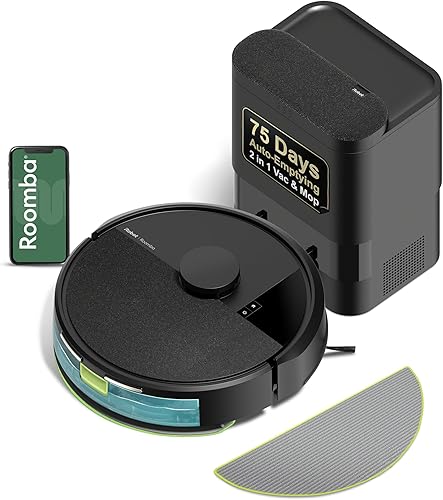
Roomba 104 2-in-1: Best for less frequent emptying
- Vacuum and mop modes
- AutoEmpty dock
- Carpet detection while mopping
- LiDAR mapping
The Roomba 104 2-in-1 adds mopping and an AutoEmpty dock, which holds debris in a bag for up to 75 days. It also detects and avoids carpets while mopping.
Pros
- AutoEmpty dock reduces frequent bin emptying
- Vacuum-only, mop-only and combo options
- Carpet detection while mopping
Cons
- Uses 2.4 GHz Wi-Fi for setup and operation
- Mop and self-empty features add more parts to manage
The Roomba 104 2-in-1 stands out for buyers who want both mopping and less frequent bin emptying. Its AutoEmpty dock holds debris in a bag for up to 75 days, and the robot can vacuum, mop or run both functions together.
ClearView LiDAR maps the home, and the robot detects and avoids carpets while mopping. That’s useful in mixed rooms where you want hard floors wiped without sending the mop over rugs.
The dock takes more room than a basic charging base, and the app uses 2.4 GHz Wi-Fi. Compare the station’s footprint with your available space before choosing it.
Choose it if you want a dock and a mop in one setup. If mopping is your main priority, explore our robot vacuum and mop combos for hardwood floors.
Shark Navigator AV2120: Best for row-by-row floor coverage
- SmartPath LiDAR mapping
- Row-by-row cleaning pattern
- Object detection and avoidance
- Recharge and resume
SmartPath navigation maps the home and cleans in rows, while object detection helps the robot avoid items in its path. Recharge and resume can continue a task after charging.
Pros
- Row-by-row cleaning pattern
- Detects and avoids objects
- Anti-hair-wrap brushroll
Cons
- Vacuum only, with no mop function
- No runtime beyond the stated 120 minutes
The Shark Navigator AV2120 fits buyers who prefer row-by-row cleaning and object detection. SmartPath uses LiDAR to map the home and clean in rows, while the robot can detect and avoid objects in its path.
Its brushroll is designed to engage both carpets and hard floors, and Shark describes it as anti-hair wrap. The robot can recharge and resume when the battery runs low.
This model vacuums only, and its stated runtime is 120 minutes. Choose it if those navigation and brush features matter more to you than app-based room controls or mopping.
ILIFE A30s: Best for app-based room control
- LiDAR mapping
- App room selection and schedules
- No-go zones and virtual walls
- Remote and voice control
The A30s offers LiDAR mapping, app room selection and no-go zones, plus a remote for simpler control. It vacuums only, so choose a different pick if you want mopping.
Pros
- App supports room and area selection
- Remote and voice control options
- Dual anti-tangle brush
Cons
- No mopping function
- App control requires 2.4 GHz Wi-Fi
The ILIFE A30s pairs LiDAR mapping with app-based room and area selection. You can set schedules, no-go zones and virtual walls, then use the included remote or compatible voice controls.
Its dual anti-tangle brush design targets pet hair, and the app can adjust suction and enable carpet boost. This model is vacuum-only, so it won’t mop.
The 2.4 GHz Wi-Fi requirement applies to its app control. Pick it if you want a mapped vacuum with several control options, but don’t need a mop or self-emptying station.
ILIFE A30s Plus: Best for a self-emptying station
- Self-emptying station with 2.2 L capacity
- LiDAR mapping
- Up to 10,000 Pa in Spot Mode
- App, voice and remote controls
This vacuum-only model pairs LiDAR mapping with a self-emptying station and several control options. The station is the key reason to choose it over a simpler robot.
Pros
- Self-emptying station and included dust bags
- App, voice and remote controls
- Dual anti-tangle brush design
Cons
- No mopping function
- App control requires 2.4 GHz Wi-Fi
The ILIFE A30s Plus makes the most sense if reducing bin-emptying chores is high on your list. Its station automatically empties after each cleaning and has a 2.2 L capacity, with dust bags included.
LiDAR mapping and app controls let you customize rooms, schedules and no-go zones. It also has remote and voice controls, plus dual anti-tangle brushes.
The robot is vacuum-only, and app scheduling requires 2.4 GHz Wi-Fi. Choose it over a simpler model when the dock matters more than mopping.
Tikom Self-Emptying Robot: Best for vacuuming and mopping with a dock
- Vacuuming and mopping
- Self-emptying base with 3 L dustbag
- LiDAR mapping
- Up to 5 saved floor maps
The Tikom pairs vacuuming and mopping with a self-emptying base. Its app includes no-mop zones, which help keep the mop away from rugs.
Pros
- Vacuum and mop functions
- Self-emptying base with a 3 L dustbag
- Supports up to 5 saved maps
Cons
- Mop holder must be removed or rugs set as no-go zones in mop mode
- App control requires Wi-Fi
The Tikom combines vacuuming, mopping and a self-emptying base, making it a feature-rich fit for buyers who want fewer manual steps. LiDAR mapping supports up to 5 saved floor maps, and the app offers room selection and no-mop zones.
Its 3 L dustbag is designed to reduce frequent emptying, while the robot can recharge and resume cleaning. For mop mode, remove the mop holder or use a no-go zone to keep the robot away from carpet.
That setup takes more planning than a vacuum-only pick. Choose it when mopping and a dock are useful enough to justify managing both.
VONKO LiDAR Robot Vacuum and Mop: Best for longer cleaning runs
- Vacuum and mop in one cycle
- LiDAR mapping
- Up to 180 minutes of runtime
- Self-emptying station
The VONKO combines vacuuming and mopping with a self-emptying station and up to 180 minutes of runtime. App controls include room selection and no-go zones.
Pros
- Longest stated runtime among these picks
- Self-emptying station
- App supports room selection and no-go zones
Cons
- App controls are needed for customized cleaning
- Mopping is intended for hard floors
The VONKO suits buyers who want a mapped vacuum and mop with a longer stated run time. It offers up to 180 minutes, LiDAR mapping and a self-emptying station.
App controls support room selection, suction adjustment, maps and no-go zones. The robot can vacuum and mop in one cycle, with mopping intended for hard floors.
Choose it for the combination of runtime and dock, especially if your cleaning area is large. As with any combo robot, check that its mopping approach fits the mix of flooring in your home.
ILIFE V2: Best for simple remote control
- Remote control with no Wi-Fi required
- 2.99 in slim profile
- Tangle-free suction port
- Up to 120 minutes of runtime
The V2 keeps control simple with a remote and one-touch button, and it does not need Wi-Fi to run. Its slim profile may fit under furniture with enough clearance.
Pros
- Remote control works without Wi-Fi
- Slim 2.99 in profile
- Tangle-free suction port
Cons
- Vacuum only, with no mop function
- No app-based room mapping
The ILIFE V2 is the simplest pick for buyers who want a remote and no Wi-Fi requirement. It has auto, spot and edge modes, and can run for up to 120 minutes before returning to its charging dock when battery is low.
Its 2.99 in profile may fit beneath furniture with enough clearance. The tangle-free suction port is designed to pick up hair without a roller brush.
There’s no app-based map or room selection, and it doesn’t mop. Choose it for straightforward scheduled vacuuming and a slim body, not for detailed control.
ROPVACNIC Robot Vacuum and Mop: Best for low-clearance furniture
- 2.99 in height
- Vacuum and mop functions
- App, remote and voice control
- Up to 5,200 Pa suction
The ROPVACNIC combines vacuuming and mopping in a 2.99 in-high body that may fit beneath furniture with suitable clearance. Its controls include app, remote and voice options.
Pros
- Low 2.99 in profile
- Vacuum and mop functions
- App, remote and voice control
Cons
- No LiDAR mapping
- Up to 120 minutes of stated runtime
The ROPVACNIC fits rooms where furniture clearance is tight and you want vacuuming plus mopping. Its 2.99 in height may fit below furniture with suitable space, and the controls include app, remote and voice options.
It offers up to 5,200 Pa suction and a four-stage water adjustment system. The robot uses a sensing system for obstacle avoidance and returns to its charging base when its battery is low.
It does not offer LiDAR mapping, so it’s a less suitable choice if mapped room cleaning is a priority. Pick it when low clearance and combined cleaning matter more.
Which budget robot vacuum features are worth paying for?
LiDAR mapping is useful when you want room selection, schedules or no-go zones, while a remote can be enough for simpler cleaning. Mopping and self-emptying are worth considering only if you’ll use them and have room for the extra parts.
For a smaller home, compare the robot’s controls with the layout you actually clean. A basic remote can be easier to live with than app setup, while mapped rooms can save repeated manual direction in a multi-room layout.
Should a budget robot vacuum mop too?
A vacuum-and-mop combo can handle light floor wiping alongside routine pickup, but it adds water management and rug rules. If your home has many rugs, choose a model that can avoid carpets while mopping or supports no-mop zones.
The Roomba 104 2-in-1 detects and avoids carpets during mopping. The Roborock Q7 L5 has no-go zones and adjustable water levels, while Tikom requires you to remove the mop holder or set a no-go zone for carpets.
Are self-emptying docks useful at this price level?
A self-emptying dock can cut down on how often you empty a robot’s bin, but it takes more floor space and uses bags. The Roomba 104, ILIFE A30s Plus, Tikom and VONKO include a self-emptying option.
If you clean a small area or don’t mind emptying the robot after a run, a standard charging base may suit you better. Put the dock’s footprint and ongoing bag needs into your choice.
Verdict: choosing the best budget robot vacuum
Pick the Roborock Q7 L5 for a balanced mapped vacuum and mop, the Roomba 105 Vac for targeted room cleaning without mopping, or the ILIFE V2 for remote control without Wi-Fi. Choose the Roomba 104 2-in-1 if you want a mop and self-emptying dock together.
If you’re still deciding which features fit your home, use our robot vacuum guide to compare navigation, controls and cleaning types.
Our top 3 picks at a glance
-
1
-
2
-
3
Frequently asked questions
What should you expect from a budget robot vacuum?
A budget robot vacuum can handle routine pickup, but features vary. Some models map rooms and support schedules, while simpler picks rely on a remote or button.
Decide whether you need mopping, room controls or a self-emptying dock before paying for those extras.
Is LiDAR useful on an affordable robot vacuum?
LiDAR can map rooms and help a robot plan cleaning routes. In this group, models such as the Roborock Q7 L5, Roomba 105 Vac and ILIFE A30s use LiDAR.
Mapping helps with room-based cleaning, but it does not remove the need to clear cords and small objects from the floor.
Can a budget robot vacuum mop floors too?
Some budget robots combine vacuuming and mopping, including the Roborock Q7 L5 and Roomba 104 2-in-1. Others, such as the ILIFE A30s and Roomba 105 Vac, are vacuum-only.
Check whether the robot can keep rugs dry during mopping if your rooms mix hard floors and rugs.
Do budget robot vacuums need Wi-Fi?
Not every model needs Wi-Fi for basic control. The ILIFE V2 works with its remote or one-touch button, while several mapped models use 2.4 GHz Wi-Fi for app features.
Choose based on whether you want schedules, room selection and no-go zones from a phone.
Is self-emptying worth considering on a budget?
A self-emptying dock can reduce how often you empty the robot's bin, but it adds a larger station and dust bags to manage. The Roomba 104 2-in-1, ILIFE A30s Plus, Tikom and VONKO include self-emptying options.
Compare those benefits with your available floor space and maintenance preferences.


