What to Look for in a Robot Vacuum Before You Buy
Choose a robot vacuum around your floors, home layout and upkeep preferences. Check how it handles rugs, maps rooms, manages hair and dust, and whether its app or dock fits your routine.
On this page (8 sections)
- What should you look for in a robot vacuum first?
- How important are mapping and obstacle detection?
- Do you need a self-emptying dock?
- Should you get a robot vacuum that mops?
- Which controls and connectivity should you check?
- What should you expect to maintain?
- How can you compare robot vacuums before buying?
- What should you check before you buy?
To choose a robot vacuum, match its floor care, navigation and upkeep to your home. Check whether it suits your mix of rugs and hard floors, maps the rooms you want cleaned, and needs an app or dock you are comfortable using.
Start by noticing where dust, crumbs and hair collect. Then measure low-clearance spots and door transitions, and decide how much control you want over rooms, schedules and mopping.
For a wider overview of robot styles and how they fit different homes, read our robot vacuum guide.
What should you look for in a robot vacuum first?
The best starting point is your floor plan and your main cleaning problem. A home with rugs, pets or many small rooms may need different features from an open apartment with mostly hard floors.
Write down the floors in each room, the messes you want picked up, and any places the robot must avoid. This short list can help you compare features without being swayed by a long spec sheet.
| Your home or routine | Features to compare |
|---|---|
| Mixed rugs and hard floors | Carpet detection, mop lifting or no-mop zones |
| Hair from people or pets | Brush design and how easy it is to clear hair |
| Several rooms or floors | Mapping and multi-level support |
| Cluttered routes | Obstacle detection and room controls |
| Less frequent emptying | Dock type and dust capacity |
| App-free preference | Buttons, remote or voice options |
No feature makes every robot suitable for every home. Check the details that matter for your layout, then see how the robot's everyday controls fit your routine.
How do you choose a robot vacuum for your floors?
Choose a robot vacuum by checking the floor surfaces and transitions it will cross. Carpet, rugs, hard floors and raised thresholds can affect whether a robot can clean the route as you expect.
If you want it to vacuum and mop, check how it avoids wetting rugs. Some models lift a mop module on carpets, while others let you set no-mop areas in an app.
If you prefer a simpler setup, a vacuum-only robot avoids mop-pad upkeep.
Measure rug edges and floor transitions that might stop the robot. Our guide to robot vacuums crossing transitions covers the questions to check before choosing.
Which robot vacuum features matter for navigation?
Look for navigation features that fit your room layout, such as mapping, room selection and obstacle handling. A robot that maps rooms may make it easier to plan routes or target a specific area.
Check whether the robot supports multiple floor maps if you plan to carry it between levels. Also consider whether its obstacle detection suits your home: loose cables, toys and small items can still need clearing before a run.
How important are mapping and obstacle detection?
Mapping can help a robot plan a route and give you more control over where it cleans. The right mapping features depend on how many rooms and levels you need it to cover.
Some robots use LiDAR to map rooms and navigate in rows. Others may offer obstacle detection or app controls such as room selection, no-go zones and virtual walls.
Compare the controls you will use rather than assuming that one navigation label includes every feature.
What should you check about robot vacuum mapping?
Check whether the robot can save the maps and room choices you need. For a multi-level home, confirm that the model supports multiple floor maps and consider how you will move the robot between floors.
Room selection and no-go zones can help you target cleaning or keep a robot out of specific areas. If you do not want to use a phone, check what you can control with the robot's buttons, a remote or voice commands.
Can a robot vacuum avoid clutter?
Obstacle detection can help a robot move around some objects, but it does not remove the need to prepare the floor. Check what the specific model says it can detect and clear loose cables or small objects before cleaning.
If your home has busy walkways, pay attention to whether the robot can resume cleaning after returning to its dock to recharge. This can affect how it handles a long run, but it does not guarantee that every room will be cleaned in one uninterrupted pass.
Do you need a self-emptying dock?
Choose a self-emptying dock if you want to empty the dust container less often. Compare its capacity and design, along with the floor space the dock needs.
Some docks use a dust bag, while others are bagless. A larger capacity may mean fewer emptying tasks, but it does not make upkeep disappear.
Check how you will empty the dock and clean the robot's brushes and filter.
For example, the Roborock Q10 S5+ has a self-emptying station with a 2.7 L dust bag, while the Shark AI Ultra AV2511AE has a bagless base described as holding up to 60 days of debris.
Should you get a robot vacuum that mops?
Get a vacuum-and-mop robot if you want one machine to vacuum and handle light hard-floor upkeep. Check whether it can keep rugs dry and what cleaning tasks the mop is meant to handle.
Mop features vary. Some models use a washable pad, while others offer adjustable water or mopping modes.
You may still need to wash the pad and handle larger spills by hand.
The Roomba 115X Combo vacuums and mops in one pass, has a washable microfiber pad for sealed hard floors, and lets you set No Mop Zones in its app.
If you are comparing combo models, read our guide to robot vacuum and mop options for hardwood floors.
Which controls and connectivity should you check?
Choose controls you will actually use, including app settings, buttons, remote controls or voice commands. Check Wi-Fi requirements before buying if you do not want to set up a phone app.
Some robots need a 2.4 GHz Wi-Fi connection for app setup or features. Others include a remote or let you start a run from the robot itself.
For more detail on trade-offs, read whether robot vacuums need Wi-Fi.
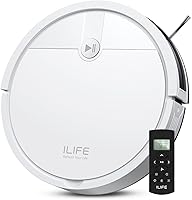
The ILIFE A30s offers app controls for schedules, rooms and no-go zones, along with voice and remote control. It is a vacuum-only model, so it may suit a buyer who wants mapping and adjustable cleaning without mop-pad care.
What should you expect to maintain?
A robot vacuum still needs regular care for its brushes, filter, dust container and sensors. A dock can reduce container emptying, but it does not remove those routine tasks.
Before choosing, check how the brush handles hair and whether parts are easy for you to reach. Combo models also add a mop pad to wash or replace.
The right choice is the one whose upkeep feels manageable, not just the one with the longest feature list.
Consider these recurring tasks:
- Empty the robot or dock as needed.
- Clear hair and debris from brushes.
- Clean or replace filters as the manual directs.
- Wash or replace mop pads on combo models.
- Wipe sensors and charging contacts when needed.
How can you compare robot vacuums before buying?
Compare a short list of features tied to your needs, rather than ranking robots by suction numbers alone. Check cleaning surfaces, mapping, obstacle handling, dock type, controls and maintenance side by side.
The examples below show how different features can match different routines. They are not a full ranking, so use them to identify which details to compare.
| Model | Feature that may fit your needs |
|---|---|
| Roborock Q10 S5+ | Self-emptying station, LiDAR mapping and carpet detection |
| Shark AI Ultra AV2511AE | Bagless self-emptying base and LiDAR mapping |
| Roomba 115X Combo | Vacuuming and mopping, washable pad and No Mop Zones |
| ILIFE A30s | Vacuum-only cleaning with app, voice and remote control |
What should you check before you buy?
Before buying, check the robot's dimensions, charging spot and route through your home. Measure low furniture clearance, narrow passages and transitions, then make sure the dock has a suitable place near power.
Read the setup details for Wi-Fi and app requirements, and confirm which accessories or replacement parts you may need. If you need the robot to handle multiple floors, verify its map support and how you will move it between levels.
Pick a vacuum-only robot if you want simpler upkeep and do not need mopping. Choose a combo model if light hard-floor mopping matters, and prioritize mapping or a self-emptying dock when those features solve a clear daily problem.
For more model options, see our robot vacuum picks.
Sources
Frequently asked questions
What should I look for in a robot vacuum?
Start with the floors and messes it needs to handle, then check navigation, obstacle handling, dock type, app controls and maintenance. If you have rugs, long hair or a mixed layout, confirm how the robot handles those details before you buy.
Is mapping important in a robot vacuum?
Mapping can help a robot plan room routes and let you select areas or rooms, depending on the model. Check whether it supports the floor plan you need, such as multiple levels, and whether you can set no-go areas in its app.
Do you need a self-emptying robot vacuum?
A self-emptying dock can reduce how often you empty the robot's dust container, but it takes more space and still needs maintenance. Compare the dock's capacity and bag or bagless design with how often you want to handle debris.
Should you choose a robot vacuum and mop?
Choose a vacuum-and-mop model if you want it to handle light hard-floor upkeep as well as vacuuming. Check how it protects rugs, what controls the mop settings, and whether you are comfortable washing or replacing the pad.
Can a robot vacuum replace a regular vacuum?
A robot vacuum can help with routine floor upkeep, but it may not reach every corner, stair or tight spot. Keep a regular vacuum or other tool if you need to clean those areas or tackle occasional larger messes.