Do Robot Vacuums Have Cameras? What Each Type Uses
Some robot vacuums have cameras, but many use LiDAR, floor sensors, or other tools instead. Check the navigation features for the specific model to understand what it uses and what that means for privacy.
On this page (8 sections)
- Do robot vacuums have cameras?
- What does a camera do on a robot vacuum?
- How is LiDAR different from a camera?
- What other sensors do robot vacuums use?
- Which camera-free robot vacuum options are listed here?
- Do robot vacuums need Wi-Fi to use their sensors?
- How can you check a robot vacuum's privacy features?
- Which type should you choose?
Some robot vacuums have cameras, but many navigate with LiDAR, floor sensors, or other tools instead. Check the model's navigation details if you want to know whether it has a camera and what that could mean for privacy.
The word “smart” doesn't tell you which sensors a robot uses. A camera can help a robot recognize objects, while LiDAR can measure distances and build a map without capturing ordinary images.
Do robot vacuums have cameras?
Some do, but camera use varies by model. A robot may use a camera to recognize objects, help navigate, or support obstacle avoidance.
Other robots use LiDAR, which measures distances with laser light. Basic models may rely on bump, cliff, and floor sensors without building a detailed room map.
Look for specific terms in the navigation information, such as camera, visual recognition, AI obstacle avoidance, or LiDAR. If the maker names only a general feature such as “smart navigation,” that phrase alone doesn't tell you whether a camera is inside.
For a broader explanation of the sensors and cleaning steps, see how a robot vacuum works.
What does a camera do on a robot vacuum?
A camera can help a robot identify objects or understand where it is in a room. Its role depends on the model and may be different from a camera used to record video for a person to watch.
Some camera systems are designed to recognize common obstacles, such as cords, toys, or pet bowls. Others use images to help map or orient the robot as it moves.
A camera doesn't guarantee that a robot will avoid every object. Small items, changes in lighting, or an unfamiliar layout may affect what it detects, so pick up fragile or hazardous objects before a cleaning run.
Does a robot vacuum camera send images to the cloud?
There isn't one answer for every model. A camera may process images locally, send information through an app, or use another setup, so check the manufacturer's privacy policy and product documentation for the exact model.
Look for details about image capture, storage, sharing, and deletion. Also check whether camera-related features can be turned off, and whether doing so affects navigation or obstacle avoidance.
Don't assume an object-recognition feature means a person can view a live camera feed. Confirm what the maker says the feature does and what controls are available.
How is LiDAR different from a camera?
LiDAR measures distance; a camera captures images. A robot can use LiDAR to map rooms and plan routes without relying on a camera for that task.
LiDAR units often sit on top of the robot and scan the surrounding space. The resulting map can support room-by-room cleaning or saved zones, though the available controls depend on the model.
A camera and LiDAR can also work together. If privacy is your main concern, verify whether the particular robot includes a camera instead of treating LiDAR as proof that it doesn't.
Can LiDAR work in the dark?
LiDAR can measure distance without visible room light, but that doesn't mean every part of a robot's navigation works equally well in the dark. A model may use more than one sensor, and each can have a different role.
Check the maker's navigation description if you plan to run the vacuum at night. Clear loose cords and small objects from the floor regardless of the lighting.
What other sensors do robot vacuums use?
Many robots use sensors besides cameras and LiDAR. These can include bump sensors for contact, cliff sensors near drops, and sensors that help the robot follow a wall or detect floor changes.
A simple robot may use those sensors to move around a space without making a saved map. It can still clean, but its route planning and app controls may differ from those on a mapping model.
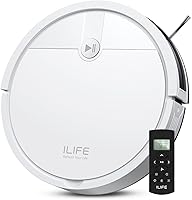
The ILIFE V2 uses a physical remote and one-touch button, and its maker describes it as operating without Wi-Fi. That may suit someone who prefers straightforward controls over app-based mapping.
Check whether a robot's sensors suit your floors, furniture, and room layout. The guide to choosing a robot vacuum covers the features that affect fit.
Which camera-free robot vacuum options are listed here?
The eufy C28 uses LiDAR navigation and is described as camera-free. The other models below list mapping or obstacle features, but their supplied feature details don't specify whether they use cameras.
The eufy C28's navigation information says it avoids obstacles at least 3 × 3 × 3 cm without cameras. That makes it the clearest match here if you want a model explicitly described as camera-free.
Roborock says the Q7 M5+ uses PreciSense LiDAR to map a home and plan cleaning paths. The available feature details don't specify camera use, so check the maker's privacy information if you need a firm answer.
The Roomba Max 715 Pet combines ClearView Pro LiDAR mapping with PrecisionVision AI obstacle avoidance. Those features describe mapping and object response, but check iRobot's privacy information to confirm how its camera-related functions work.
Do robot vacuums need Wi-Fi to use their sensors?
A robot can use onboard sensors without Wi-Fi, but connected features may need an app or network. The exact split between button controls, scheduled cleaning, maps, and remote access depends on the model.
For example, the ILIFE V2 includes a remote and one-touch control. The Roborock Q7 M5+ describes app controls for scheduling, no-go zones, and map progress, and its app supports 2.4 GHz Wi-Fi.
If you want a robot that can run without a network connection, check its controls and setup instructions before buying. See whether robot vacuums need Wi-Fi for more details.
How can you check a robot vacuum's privacy features?
Read the maker's privacy information for the exact model and app. Focus on what the robot collects, whether images are stored or shared, and what settings let you control that data.
Check for camera references in the product's navigation features and in its privacy policy. If the wording is unclear, contact the maker before connecting the robot to your home network.
You can also consider where the robot will run. Keep it out of rooms where you don't want a camera-equipped device, and use any available privacy controls.
Which type should you choose?
Choose a camera-free model if avoiding onboard cameras is your main priority, and confirm that the maker describes the model that way. The eufy C28 is the option here explicitly described as using LiDAR without cameras.
Choose a robot with camera-based obstacle recognition if identifying objects matters to you, after checking its privacy terms and settings. Choose LiDAR mapping if you want room maps and planned routes, while confirming whether the same model also has a camera.
If you mainly want simple start controls, the ILIFE V2 has a remote and a one-touch button. Compare navigation, controls, and floor fit in what to look for in a robot vacuum before you decide.
Frequently asked questions
Do all robot vacuums have cameras?
No. Robot vacuums use different navigation systems, including cameras, LiDAR, and simpler sensors.
Check the specific model's navigation details before you buy.
A camera-free model can still map or move around a home with other sensors, depending on its design.
Can a robot vacuum camera record inside my home?
It depends on the model and how its camera works. A camera used for obstacle detection may process images to identify objects, while other models may send or store images.
Review the maker's privacy details and app settings to learn what data is captured, stored, or shared.
Is LiDAR the same as a camera?
No. LiDAR measures distance with laser light to help map a room, while a camera captures images.
Some robots combine camera and LiDAR systems, and others use one or the other.
Check the model's stated navigation features to tell which tools it uses.
Can a robot vacuum work without Wi-Fi?
Some robot vacuums can start with a button or remote, while app features such as scheduling or map controls may need Wi-Fi. Check the specific model's controls and setup instructions.
Our guide to robot vacuums without Wi-Fi explains what to consider.