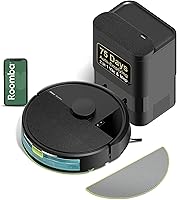
Roomba 115X Combo Robot Vacuum and Mop Review: Worth It? (November 2026)
The Roomba 115X Combo suits small to medium homes that need vacuuming and light mopping in one run. Choose the AutoEmpty version for a dock that holds debris for up to 3 months, or the standard version if you prefer a simpler dock.
On this page (7 sections)
The Roomba 115X Combo is a good fit for small to medium homes that need routine vacuuming and light mopping in one pass. Its ClearView LiDAR maps rooms, while the washable microfiber pad and No Mop Zones help with day-to-day care of sealed hard floors and nearby rugs.
The main choice is the dock. The AutoEmpty version transfers debris into a 2.5 L bag designed to last up to 3 months; the standard version returns to its dock to recharge but does not self-empty.
The Roomba 115X review: what stands out?
The Roomba 115X combines 15,000 Pa suction, a mop pad and LiDAR mapping in a robot intended for small to medium homes. Its stated coverage is up to 900 sq ft per charge, so compare that with your floor area and cleaning routine.
Roomba 115X Combo with AutoEmpty Dock: Best for less frequent bin emptying

- 15,000 Pa suction
- AutoEmpty dock with 2.5 L bag
- LiDAR mapping
- Up to 900 sq ft per charge
The 115X with AutoEmpty adds a dock bag designed to hold debris for up to 3 months. Its washable mop pad, No Mop Zones and room mapping suit routine mixed-floor cleaning.
Pros
- Empties into a sealed 2.5 L bag
- Vacuums and mops in one pass
- No Mop Zones help protect rugs
- Spot Clean targets a small mess
Cons
- 2.4 GHz Wi-Fi is required for setup
- Washable pad and filters still need care
The AutoEmpty dock is the clearest reason to choose this version over the standard 115X. It collects debris in a 2.5 L AllergenLock bag, which iRobot says traps 99% of pollen and mold and seals when removed.
The robot vacuums and mops in one pass, with a washable microfiber pad for dusty pawprints and light smudges on sealed hard floors. Its extended mop pad and edge-sweeping brush are designed to reach baseboards and corners.
Who should choose the Roomba 115X Combo?
Choose it if you want a mapped route, scheduled upkeep and a mop for light floor marks, with less frequent dust-bin handling from the AutoEmpty dock. It can also target a spill with Spot Clean rather than cleaning an entire room.
It may be a poor fit if you expect a robot mop to scrub away dried or heavy messes without attention. The pad gently lifts everyday buildup; for bigger spills or sticky patches, expect to clean the area yourself.
The 115X requires 2.4 GHz Wi-Fi for setup. You can start cleaning by voice, from the Roomba Home App or with the robot's button.
How well does the 115X handle vacuuming and mopping?
The 115X is built to vacuum and mop in the same run, with four suction levels and options for one or two cleaning passes. That gives you control over routine cleaning without changing the basic setup for every room.
For sealed hard floors, the washable pad is intended for light smudges and dusty pawprints. Set No Mop Zones to keep rugs dry while the robot mops nearby.
SmartScrub offers a deeper-scrub setting, but the maker's comparison is against standard vacuum-and-mop mode for coffee. That claim does not tell you how the robot handles every dried spill, so treat it as an option for targeted upkeep rather than a replacement for manual stain removal.
The AutoEmpty version also lists anti-hair-wrap brushes, which may appeal to homes with pets. Hair and debris still need routine checks, and iRobot recommends replacing the filters and brushes every 3–6 months.
For more help matching a combo to your floors, see our guide to robot vacuum and mop combos for hardwood floors.
What do you get with the AutoEmpty dock?
The AutoEmpty version transfers debris into a 2.5 L dock bag after a run. iRobot says the bag can support up to 3 months of hands-free cleaning, though the interval will depend on how much debris your home produces.
The bag is designed to seal when removed, which can help limit dust exposure during disposal. It still needs replacing, and the robot's mop pad needs laundering as needed.
If reducing bin emptying is your main goal, compare the 115X dock with the Roomba 105 Combo with AutoEmpty, which is designed to hold debris for up to 75 days.
How does the Roomba 115X compare with alternatives?
The 115X stands out for its stated 15,000 Pa suction and up to 900 sq ft coverage per charge. Alternatives may suit you better if you want separate mop and vacuum modes or a different dock bag interval.
| Model | Dock and emptying | Cleaning details | Best fit |
|---|---|---|---|
| Roomba 115X Combo with AutoEmpty Dock | 2.5 L bag, up to 3 months | 15,000 Pa; up to 900 sq ft per charge; vacuums and mops in one pass | Less frequent debris handling |
| Roomba 115X Combo | Charging dock, no AutoEmpty | Up to 900 sq ft per charge; vacuums and mops in one pass | 115X features without the AutoEmpty dock |
| Roomba 105 Combo with AutoEmpty Dock | Up to 75 days | Vacuum-only, mop-only or combo modes | Separate cleaning modes |
| Roborock Q7 M5+ | 2.7 L bag, up to 7–9 weeks | 10,000 Pa; three water-flow settings | Comparing another brand |
The Roomba 105 Combo review covers its three cleaning modes and AutoEmpty dock in more detail. The Roborock Q7 L5 review is another option to read if you're comparing robot vacuum and mop combos.
Is the standard Roomba 115X enough?
The standard Roomba 115X offers the same core vacuum-and-mop approach without the AutoEmpty dock. It still maps rooms with ClearView LiDAR, supports No Mop Zones and Spot Clean, and returns to its dock to recharge.
Roomba 115X Combo: Best for the 115X without AutoEmpty

- Vacuums and mops in one pass
- LiDAR mapping
- Washable microfiber pad
- Up to 900 sq ft per charge
This version keeps the 115X's mapping, washable pad and adjustable cleaning choices. It returns to its dock to recharge, but does not include the AutoEmpty dock.
Pros
- Combines vacuuming and mopping
- Has No Mop Zones and Spot Clean
- Offers 1 or 2 cleaning passes and 4 suction levels
Cons
- No AutoEmpty dock
- 2.4 GHz Wi-Fi is required for setup
Choose this version if you don't mind handling the robot's debris yourself and want the 115X cleaning features. Its listed controls include the app and robot button; setup requires 2.4 GHz Wi-Fi.
The AutoEmpty version is a better match if you want debris transferred into a sealed bag after cleaning. Consider how often you run the robot and whether reducing that chore is worth choosing the dock bundle.
What should you know before setup and care?
Plan on 2.4 GHz Wi-Fi for setup and a clear route through the rooms you want cleaned. LiDAR maps rooms and the robot cleans in rows, but shoes, cords and other small objects can still disrupt a run.
Use the app to set No Mop Zones before a mopping run near rugs. Confirm the washable pad is attached and clean, and choose the water or solution level for the task.
After cleaning, launder the pad as needed. iRobot recommends changing filters and brushes every 3–6 months to maintain cleaning performance.
If you are still deciding what features matter most, our guide to choosing a robot vacuum explains how to compare navigation, floor types and upkeep.
Should you buy the Roomba 115X Combo?
Choose the Roomba 115X Combo with AutoEmpty if you want mapped vacuuming and light mopping with less frequent bin emptying. Pick the standard 115X if you want its core cleaning features and are comfortable handling debris yourself.
Consider the Roomba 105 Combo if separate vacuum-only and mop-only modes matter more, or compare a different brand if its dock and cleaning settings suit your routine. Our robot vacuum and mop guide can help you narrow the options by floor type.
Our score weighs specs, features and buyer feedback against what you're shopping for.
Frequently asked questions
Is the Roomba 115X Combo worth considering?
The Roomba 115X Combo is worth considering if you want vacuuming and light mopping in one run, room mapping and a washable pad. The AutoEmpty version adds a dock bag designed to hold debris for up to 3 months.
Choose another option if you need a stated large-home coverage figure or a mop designed for heavy scrubbing.
Does the Roomba 115X Combo avoid rugs while mopping?
The Roomba 115X Combo lets you set No Mop Zones so rugs stay out of the mopping area. This is an app setting, so plan to complete setup on a 2.4 GHz Wi-Fi network and mark rugs or other areas you want the robot to avoid.
What is the difference between the Roomba 115X versions?
The Roomba 115X Combo with AutoEmpty includes a dock with a 2.5 L bag designed to hold debris for up to 3 months. The standard Roomba 115X Combo returns to its dock to recharge, but lacks the AutoEmpty dock.
Both versions vacuum and mop in one pass and use ClearView LiDAR.
How much maintenance does the Roomba 115X need?
The washable microfiber pad needs laundering as needed, and iRobot recommends replacing filters and brushes every 3–6 months. The AutoEmpty version also needs a bag change when full; its bag seals on removal.
Keep rugs outside the mopping area with No Mop Zones.