Roomba 105 Combo Robot Vacuum and Mop Review: Worth It? (November 2026)
The Roomba 105 Combo suits homes that want vacuuming, mopping and self-emptying in one robot. Its AutoEmpty dock holds up to 75 days of debris, while its mop avoids carpets during cleaning.
On this page (6 sections)
The Roomba 105 Combo fits homes that want one robot for vacuuming and mopping, with a dock that collects debris. It maps rooms with ClearView LiDAR and automatically avoids carpets while mopping.
Its main appeal is a mix of scheduled cleaning and reduced dust-bin emptying. The mop uses a microfiber pad, so compare it with models that wash their own pads if you want less mop maintenance.
What does the Roomba 105 Combo include?
The Roomba 105 Combo comes with an AutoEmpty dock and an extra mop pad. Its controls include the Roomba Home app, robot buttons and compatible voice assistants.
Roomba 105 Combo with AutoEmpty Dock: Best for carpet avoidance while mopping
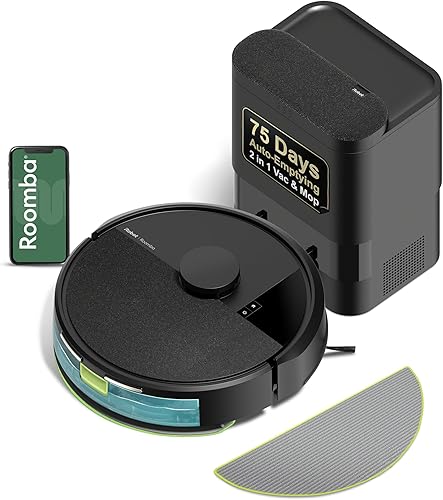
- Up to 75 days of debris in AutoEmpty dock
- ClearView LiDAR mapping
- Vacuum, mop or combo modes
- Automatically avoids carpets while mopping
A combo robot for homes that want mapped cleaning, scheduled room routines and a dock that collects debris. Its carpet avoidance while mopping is useful for mixed-floor homes.
Pros
- AutoEmpty dock holds up to 75 days of debris
- Three cleaning modes: vacuum, mop or combo
- Carpet avoidance while mopping
- App, voice and button controls
Cons
- Mop uses a pad rather than spinning pads
- Needs a 2.4 GHz Wi-Fi network for setup and operation
- The dock handles debris, not mop-pad washing
The dock's bag is designed to hold up to 75 days of debris, according to iRobot. That estimate can vary with how often you run the robot and how much dust, hair and dirt it picks up.
The robot offers vacuum-only, mop-only and combo modes. You can schedule room cleaning, choose the number of passes, set suction and adjust the liquid amount for the mop pad.
What stands out in the Roomba 105 Combo review?
The carpet avoidance while mopping is the most useful distinction for a home with both rugs and hard floors. You can also create keep-out zones in the app for areas where the robot should not go.
LiDAR mapping gives it a route through rooms, while sensors help it steer around obstacles and avoid stairs. These features can make planned, room-based cleaning easier to manage than starting the robot without a map.
The score weighs specs, features and buyer feedback against what you're shopping for. For this review, the combination of mapping, carpet avoidance and self-emptying supports an 8.3 score, while the basic pad mop and separate dock care needs limit its appeal for some homes.
How does the Roomba 105 Combo handle mixed floors?
The Roomba 105 Combo automatically avoids carpets while mopping, which helps if rugs share space with hard flooring. You can use the mop-only or combo mode, depending on the cleaning task.
Its microfiber pad is kept uniformly moist by a micro-pump, and the app lets you adjust the amount of cleaning solution pumped onto it. iRobot says SmartScrub provides twice the scrubbing of standard mop mode under its stated comparison.
A pad mop is suited to wiping floors, but it won't have the same mechanism as spinning pads or an automatic pad-washing dock. If your priority is mop care, compare the Roomba Plus 405 and other washing-dock options before deciding.
The robot vacuum and mop guide for hardwood floors can help you match a combo robot to your floor mix and cleaning habits.
How much maintenance does the AutoEmpty dock save?
The dock reduces routine debris-bin emptying, but it doesn't remove all upkeep. iRobot says its bag traps 99% of allergens as small as 0.7 microns, and the bag should be lifted out and replaced when full.
The 75-day figure is a maximum claim, not a promise for every household. Pets, foot traffic, cleaning frequency and floor area can change how quickly the bag fills.
You also need to keep the microfiber pad clean and ready for the next mop run. The dock does not wash or dry the pad, so the Roomba 105 Combo involves more manual mop care than a model with an AutoWash dock.
How does the Roomba 105 Combo compare with alternatives?
The Roomba 105 Combo is a balanced pick for carpet avoidance and a self-empty dock, while alternatives emphasize different features. The right choice depends on whether you care most about room routines, brush design or automatic mop care.
| Product | Best for | Notable difference |
|---|---|---|
| Roomba 105 Combo with AutoEmpty Dock | Carpet avoidance while mopping | Microfiber pad and AutoEmpty dock |
| Roomba 104 2-in-1 | A simpler Roomba alternative | Similar cleaning modes and mapping |
| Roborock Q7 M5+ | Longer listed hands-free intervals | Dual anti-tangle design and sealed dust bag |
| Roomba Plus 405 | Automatic mop-pad care | AutoWash dock washes and dries pads |
The Roborock Q7 L5 review offers another Roomba-combo alternative to consider. The Q7 M5+ listed here has a sealed dust bag, anti-tangle brush features and adjustable water flow, while its app requires 2.4 GHz Wi-Fi.
For brand-level context, see our Roomba vs eufy comparison. It helps frame which brand's approach may fit your cleaning routine, without assuming one model suits every home.
Who should choose the Roomba 105 Combo?
Choose the Roomba 105 Combo if you want mapped vacuum and mop routines, a dock that empties debris, and automatic carpet avoidance while mopping. It is a practical fit for homes where rugs and hard floors sit in the same cleaning area.
Consider another model if your main goal is a dock that also washes mop pads. The Roomba Plus 405 has an AutoWash dock, while the Roomba 115X review covers another combo model in the same product family.
The Roomba 105 Combo's 2.4 GHz Wi-Fi requirement is also worth checking before purchase. If your network is configured in a way that makes 2.4 GHz setup difficult, resolve that first.
Is the Roomba 105 Combo worth considering?
The Roomba 105 Combo is worth considering when you value carpet-aware mopping and fewer trips to empty a dust bin. Its LiDAR mapping, room schedules and three cleaning modes give you ways to set a repeatable routine.
Pick it if a microfiber pad and occasional bag replacement fit your expectations. Pick a washing-dock model if automatic pad care is the feature you need most, or compare a vacuum-focused robot if you rarely mop.
For help matching a robot's features to your home, read our guide to choosing a robot vacuum.
Frequently asked questions
Does the Roomba 105 Combo avoid carpets while mopping?
Yes, the Roomba 105 Combo is designed to detect and avoid carpets while mopping, so you don't need to program carpet areas first. This is useful in homes with rugs and hard floors, though you should still pick up loose items and set keep-out zones for places the robot should avoid.
Does the Roomba 105 Combo empty itself?
Yes, the included AutoEmpty dock collects debris in a bag, with iRobot stating capacity for up to 75 days of hands-free cleaning. The interval depends on your home and cleaning routine, and you'll still need to replace the bag when it is full.
Can the Roomba 105 Combo vacuum and mop at the same time?
Yes, it has vacuum-only, mop-only and combo vacuum-and-mop modes. You can set cleaning schedules, target rooms, adjust passes and suction, and choose how much liquid the robot pumps onto its microfiber pad through the Roomba Home app.
What Wi-Fi does the Roomba 105 Combo need?
The Roomba 105 Combo uses a 2.4 GHz Wi-Fi network for setup and operation. After setup, your phone can return to 5 GHz while the robot stays on 2.4 GHz, so check that your home network supports the required band before setup.


